Time reporting
without the hassle.
From scattered Excel files and manual merging to accurate time at the source — and a Horizon-ready export with one click.
For consultants, project managers & managers
Web · Mobile · PWA
The Challenge
Time reporting wastes time and creates errors
Today — manual process
- 📧 Consultants email Excel files in different formats
- ✍️ Errors in names, dates and activity codes
- 🧩 The PM manually merges everything with the Horizon export
- ⏳ Time-consuming, hard to see who's missing
- ❓ No traceability on who changed what
With TimeTracker
- ✅ Time is captured correctly right at entry
- ✅ Real-time validation — no invalid rows
- ✅ Export straight to Horizon format
- ✅ Dashboard shows status per consultant
- ✅ Full audit log of every change
The Solution
One app — the whole flow from entry to invoice
Consultants report weekly. Project managers see status, send reminders and export. Managers get an overview across all projects. All in one place, built on WSP's own infrastructure.
1 click
Horizon-ready export
100%
traceable time history
Four roles
The right view for the right person
ConsultantReport time
Fast weekly reporting on web & mobile. Sees their own history and submissions.
Project ManagerRun projects
Dashboard, reminders, deadlines, invoice verification and export.
ManagerOverview
Cross-section view of all projects, and can enter time on a consultant's behalf.
AdminFull control
Manages all users, companies, projects and permissions.
For the consultant
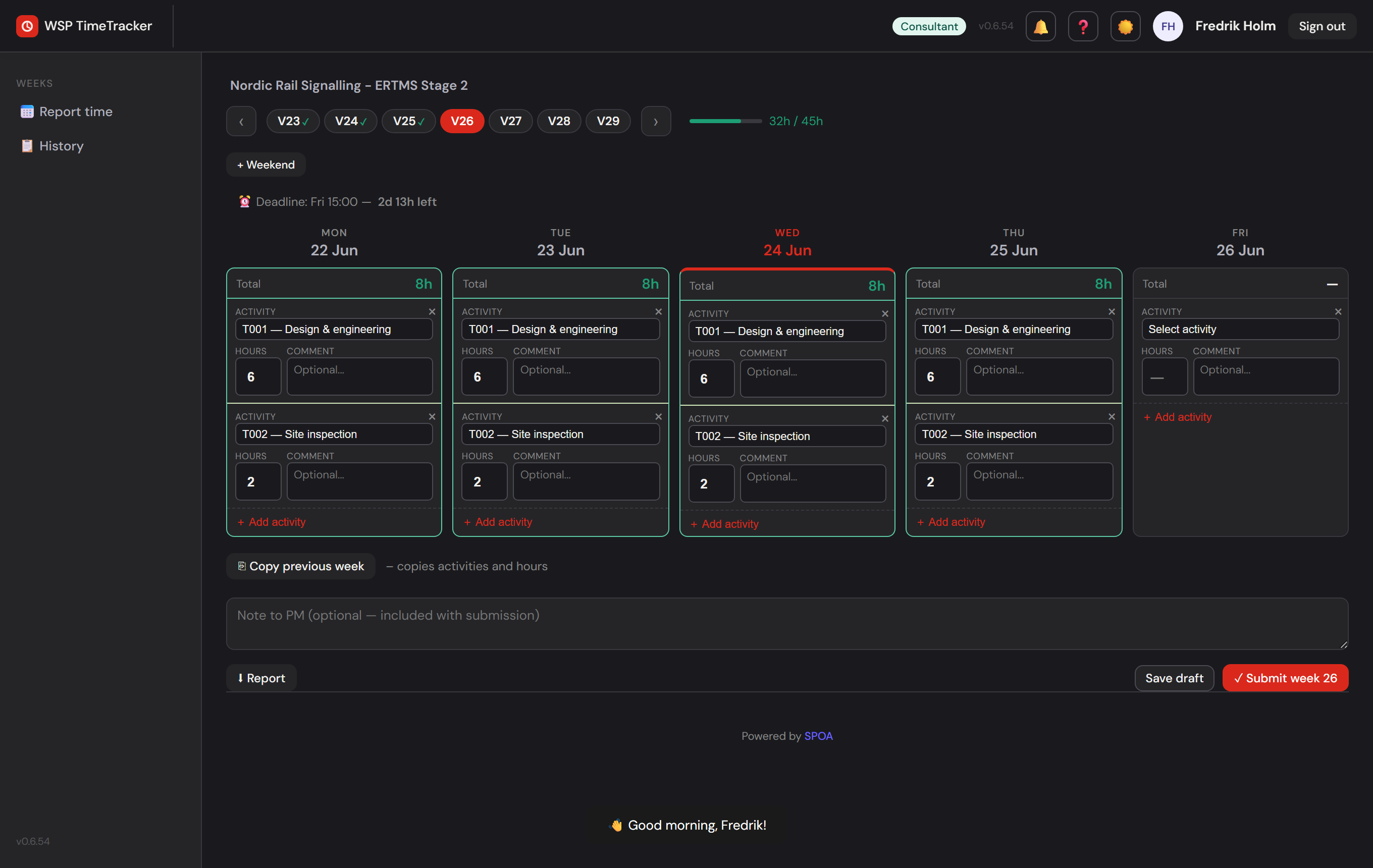
Report the week in under a minute
- 🔑
Passwordless login — magic link by email, nothing to remember.
- ⚡
Minimal clicks — every day visible, tab through the week, half-hours round automatically.
- ⎘
Copy last week — reuse activities and hours instantly.
- 📱
Works on mobile — installable PWA with a day-by-day view and push notifications.
- ✓
Submit & lock — clear status and a countdown to the deadline.
On mobile
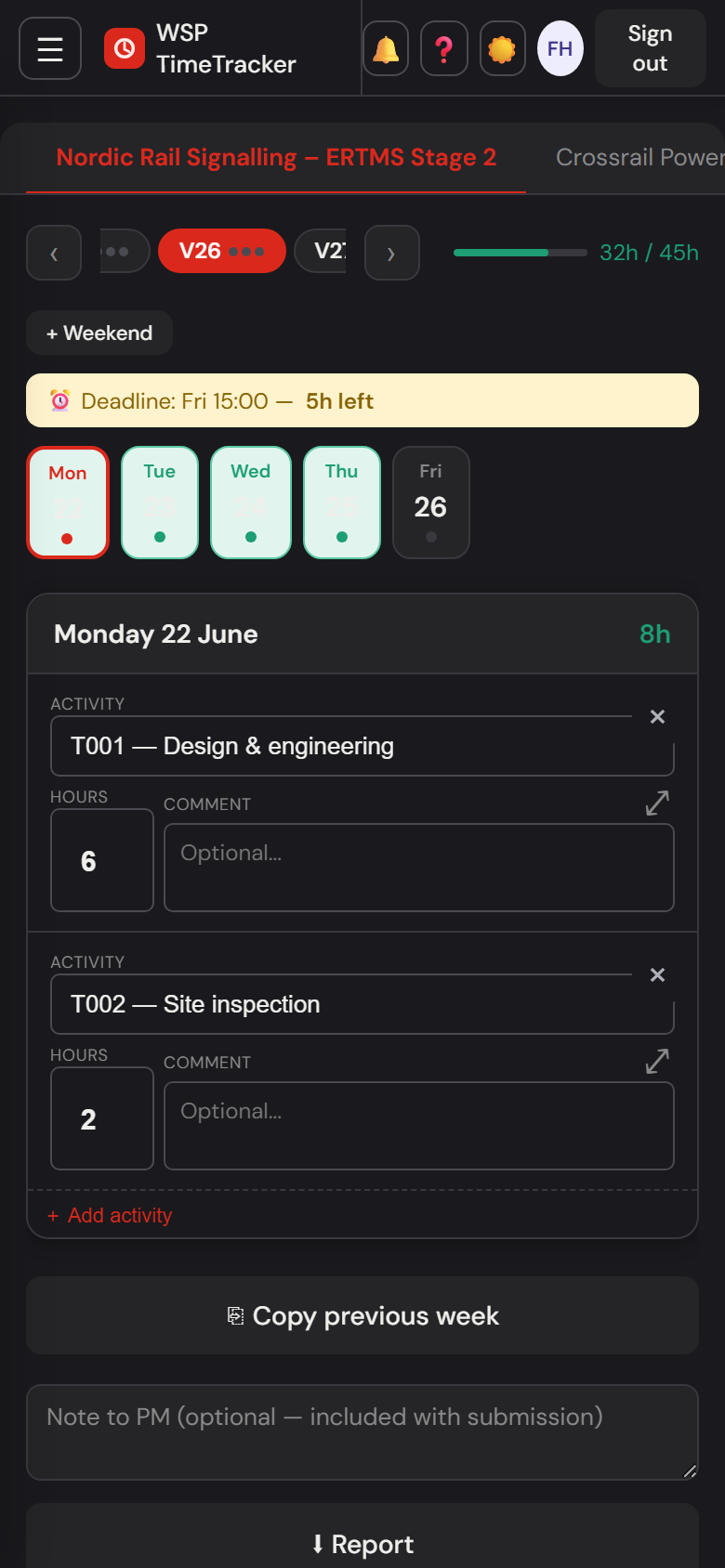
Day-by-day, made for your thumb
- 🧭
Sideways project tabs — locked to horizontal scrolling, no accidental vertical wobble when switching projects.
- 📅
One day at a time — compact cards with the day’s total and a clear "Today" badge.
- 👆
Bigger tap targets — comment fields and buttons sized for touch, not a mouse.
- ⏰
Deadline always visible — the submission countdown stays pinned at the top.
- 📲
Installable PWA — add it to your home screen, works with push notifications.
For the project manager
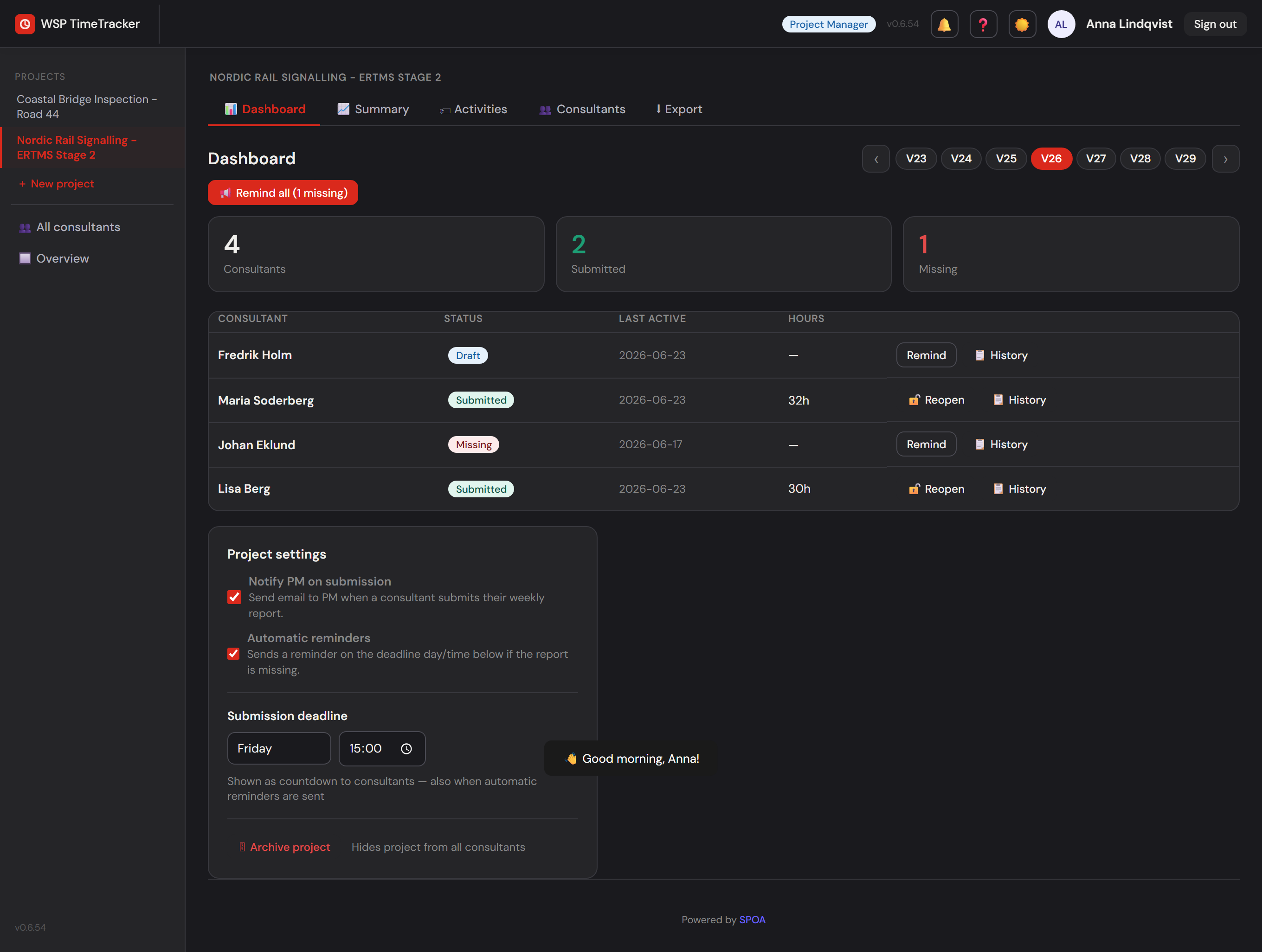
Full control over submissions
📊
Dashboard
See per consultant and week: submitted, draft or missing — in real time.
📢
Reminders
Send manually, or let the system remind automatically Thu 2pm & Fri noon.
⏰
Deadlines
Set a weekly deadline — the consultant sees a countdown.
🔓
Reopen
Unlock a submitted week for correction, with a message to the consultant.
🏷
Activities
Define the project’s activity codes and who can book on what.
⬇
Export
Automatically detects the Horizon source format (Oracle or Power BI) and merges with selectable column headers.
Time meets invoice
Built-in invoice verification
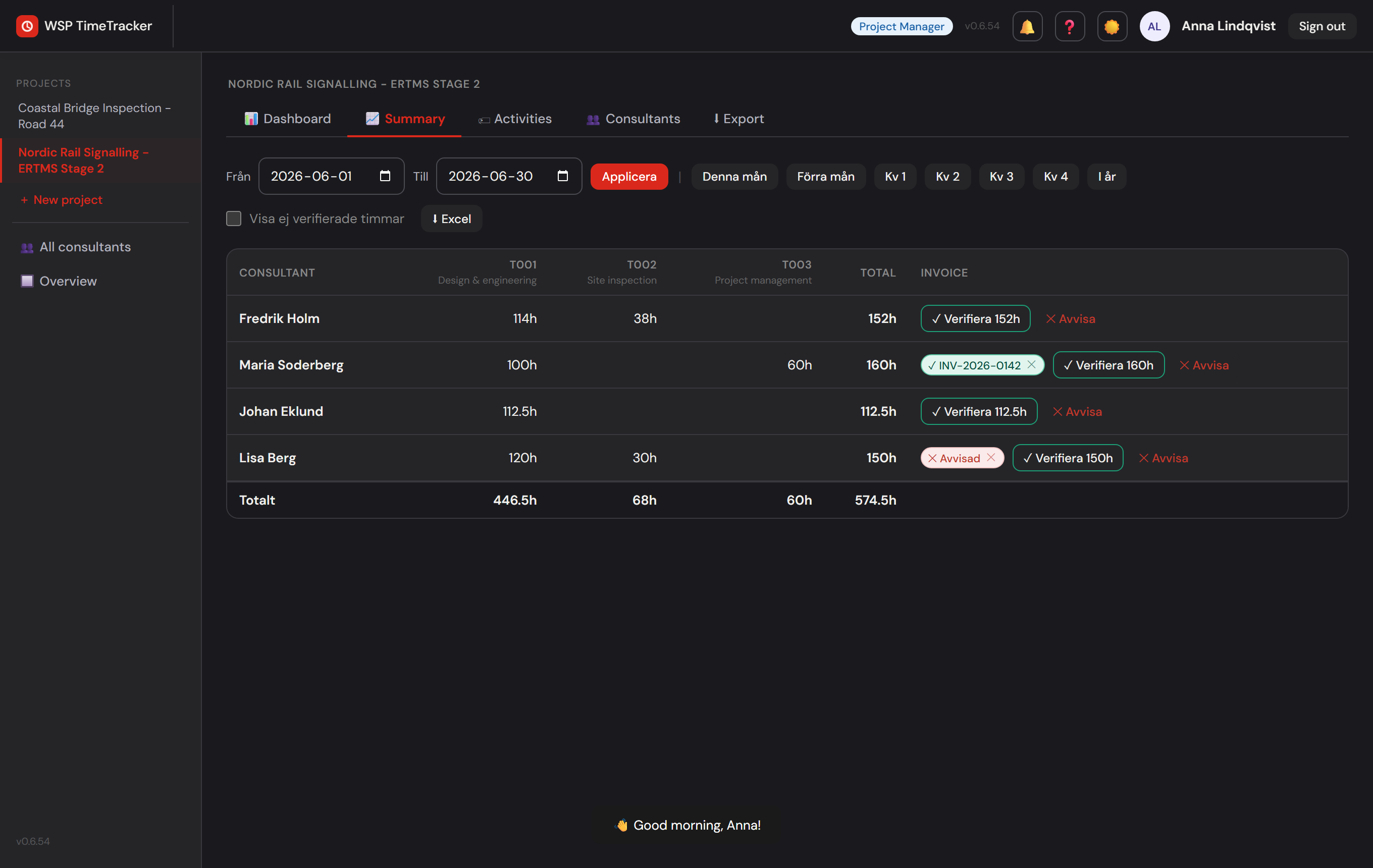
The project manager reconciles the consultant’s reported hours against the incoming invoice, enters an invoice reference, and marks the period as verified. Discrepancies show up immediately — before payment.
- 🧾
Verify a period against an invoice — hours, date range and invoice reference in one place.
- 🔎
See verified vs. unreported hours — per consultant and activity.
Overview
The whole organization in one grid
- 🔲
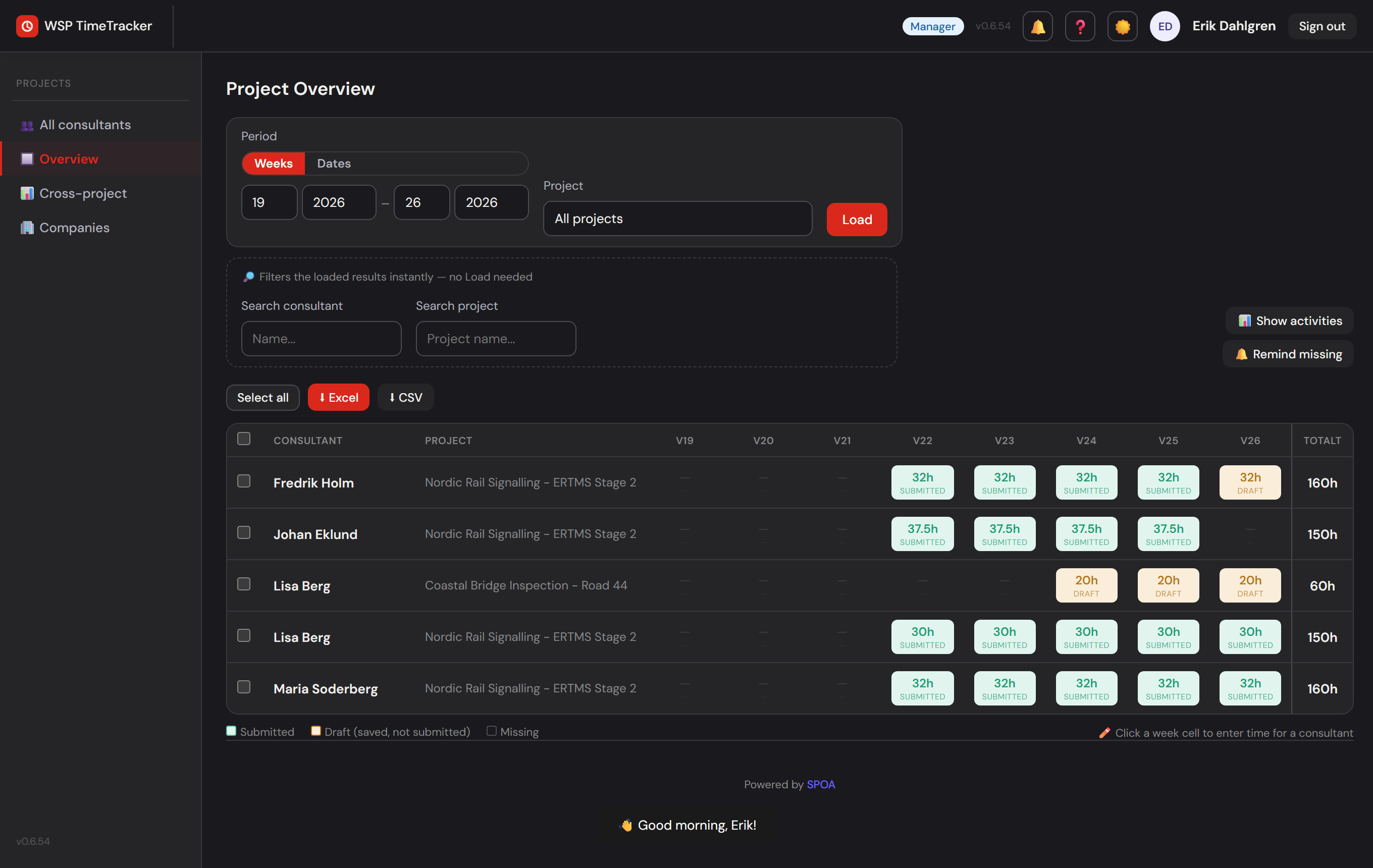
Consultant × week across all projects — green/yellow/grey shows submitted, draft or missing.
- 📊
Activity breakdown — drill down into hours per activity.
- 📅
Pick a week range or exact dates — the date picker snaps to whole ISO weeks.
- ⬇
Export selected rows — pick exactly the consultants and periods you want.
For the manager
Overview — and a helping hand
🌐
All projects
A cross-section of the whole business without being a PM on each one.
✏️
Enter time for a consultant
Click a cell in the overview and fill it in for the consultant — clearly marked "Entered by manager".
📈
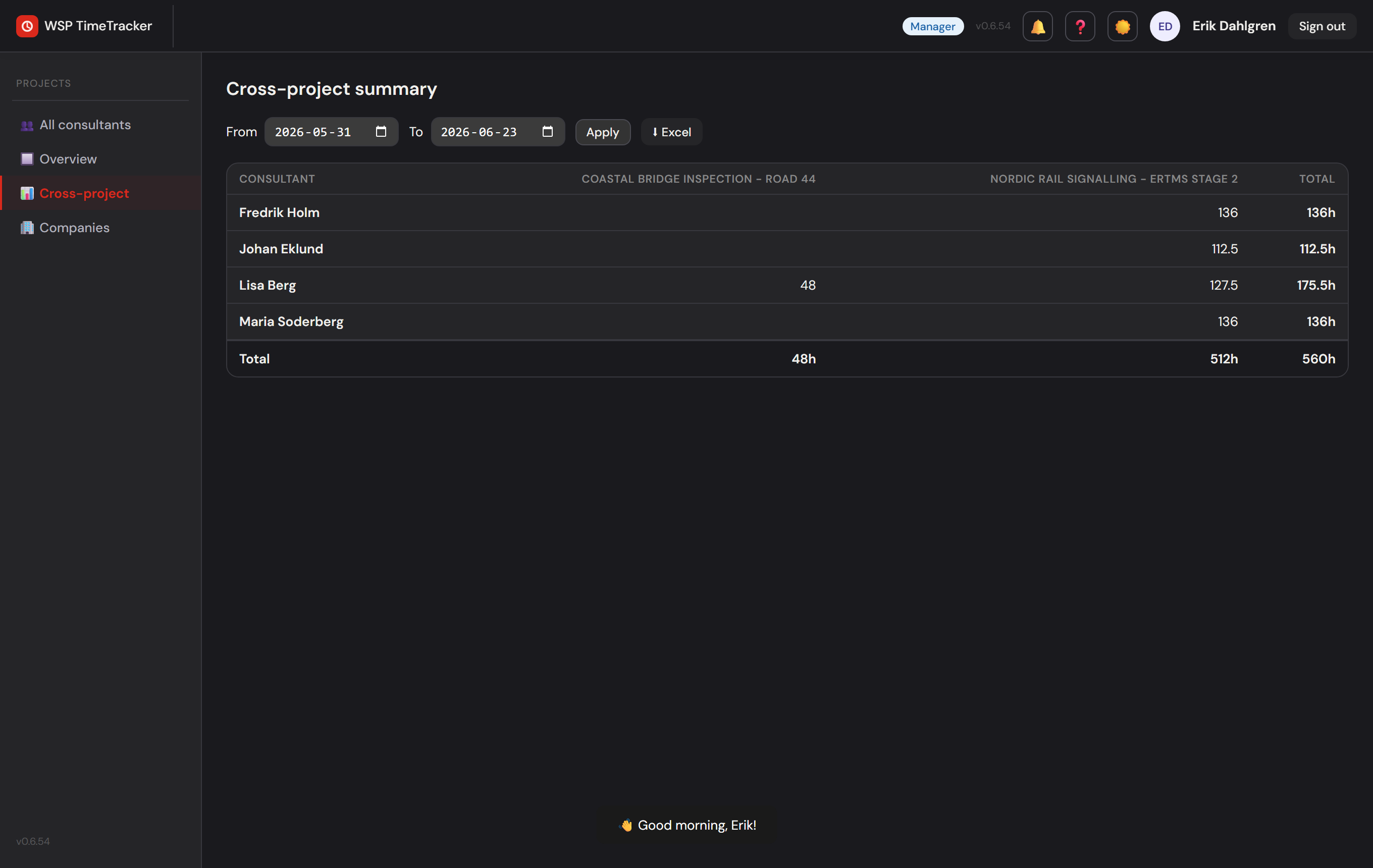
Cross-summary
Hours per consultant × project for any date range.
The attribution is visible both to the consultant and in the history — helpful, but still traceable.
Quality
Correct data, every time
🛡️
Real-time validation
Warns on hours over the daily/weekly max, requires a comment where needed — can't submit incomplete.
⏱️
Half-hour rounding
6.3 h automatically becomes 6.5 h — consistent and Horizon-compatible.
🔤
Horizon format
Names, dates and activity codes are formatted exactly as the ERP system requires.
📝
Audit log
Every change to a submitted row saves the previous value and who made the change.
Trust & traceability
Secure, traceable, built to run
🔐
Passwordless
One-time link valid for 30 min, session lasts 30 days. No passwords to leak.
👥
Role-based access
Each role only sees what it should — enforced server-side, not just in the UI.
🔔
Notifications on demand
Web Push and email, with a per-user choice: both, push only, or email only.
🧭
Login log
Tracks who logged in and when.
🐳
Docker & auto-migration
The database upgrades automatically on container start — no manual steps.
🔁
CI/CD
Every release is tested and automatically builds a ready-to-deploy image.
The value
Less admin, fewer errors
↓ errors
correct at the source
↑ speed
the week done in minutes
0 merging
no manual reconciliation
∞ scale
more projects & consultants, same flow
Project managers skip the manual puzzle, consultants skip Excel, and the organization gets a traceable, invoice-ready record.
From Excel chaos
to one click.
Ready to roll out. Built on WSP's own infrastructure, deployed with Docker, tested all the way through.
Powered by SPOA
timetracker.spoa.se